Tattoo artist
How do I find the sessions where a specific batch was used?
Enter the batch number in the Traceability search field, then open the batch to see every affected session and client.
Enter the batch number in the search bar on the "Traceability" screen, then click "Sessions involved". Tattooed lists every session where it was used, with the date and client. This is the question the entire register is designed to answer when ANSES issues a recall.
The search returns every session where the batch was used, regardless of its source. The register does not distinguish between clients referred by Tattooed and your own clients. This is what makes it an acceptable response during a recall.
Search
- Open "Traceability" in your
/prodashboard. - Enter the batch number in the search field. The comparison ignores spaces, hyphens, and capitalization. "A 1234", "a-1234", and "A1234" all refer to the same bottle and appear together.
- Click "Sessions involved" to the right of the batch to expand its sessions. Click again to close the list.
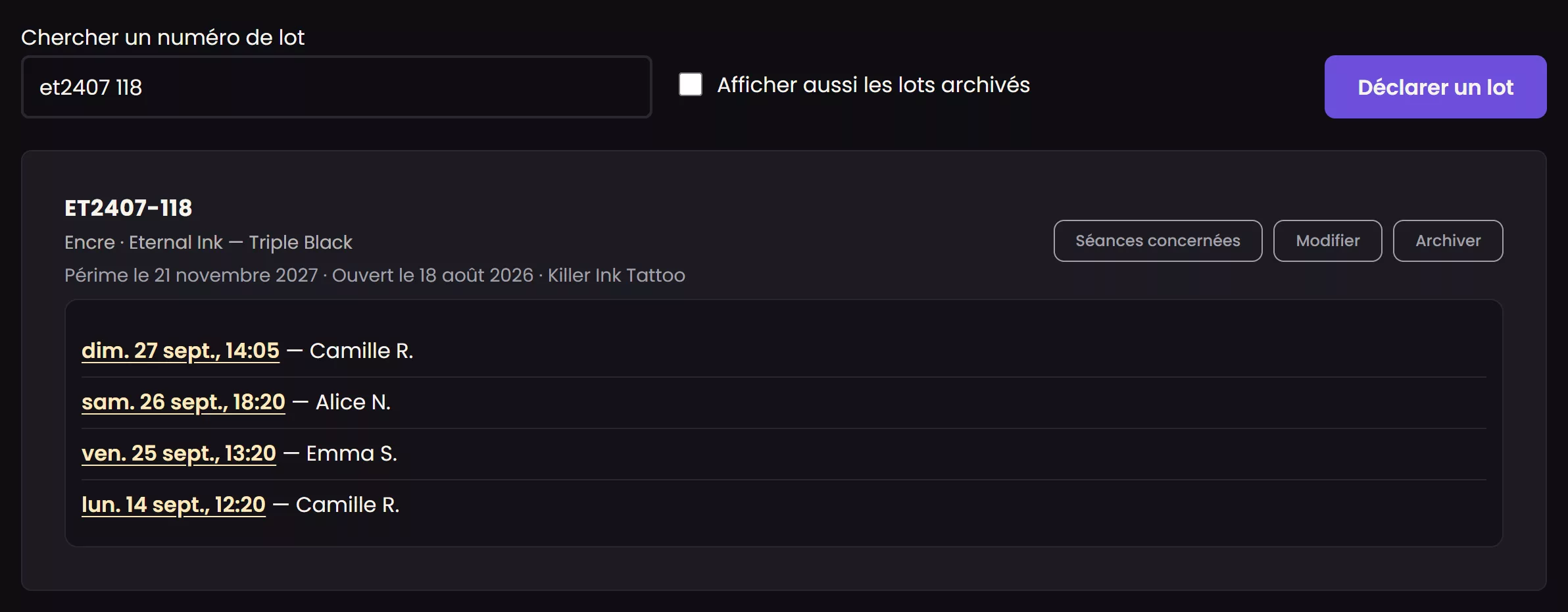
Each session shows its date and the first name of the client involved. An archived batch can still be found in the same way. Archiving a finished bottle removes it from the entry list, never from the register.
Export more than one batch
For an inspection or insurance claim covering a whole period rather than a single batch, the screen provides a CSV export of the complete register for a selected date range, with one year selected by default. Each row includes the session date, appointment, client, batch type, meaning ink, needle, or cartridge, brand, reference, batch number, expiration date, and supplier. You can find a specific number with a simple spreadsheet search without returning to the screen.
What an appointment record already shows
Conversely, the record for a specific appointment directly shows the batches used during that session, with no search required. This is useful when you know the session but still need to identify the batch, instead of the other way around.
Available with the Passion plan
This search is part of ink and needle traceability, a feature of the Passion plan. An account on a lower tier does not see this screen.