Tattoo artist
How do I sync my calendar with an external calendar?
Paste your private Google, Apple, Outlook, or other iCal URL in /pro. Tattooed imports busy times and stops offering those slots to clients.

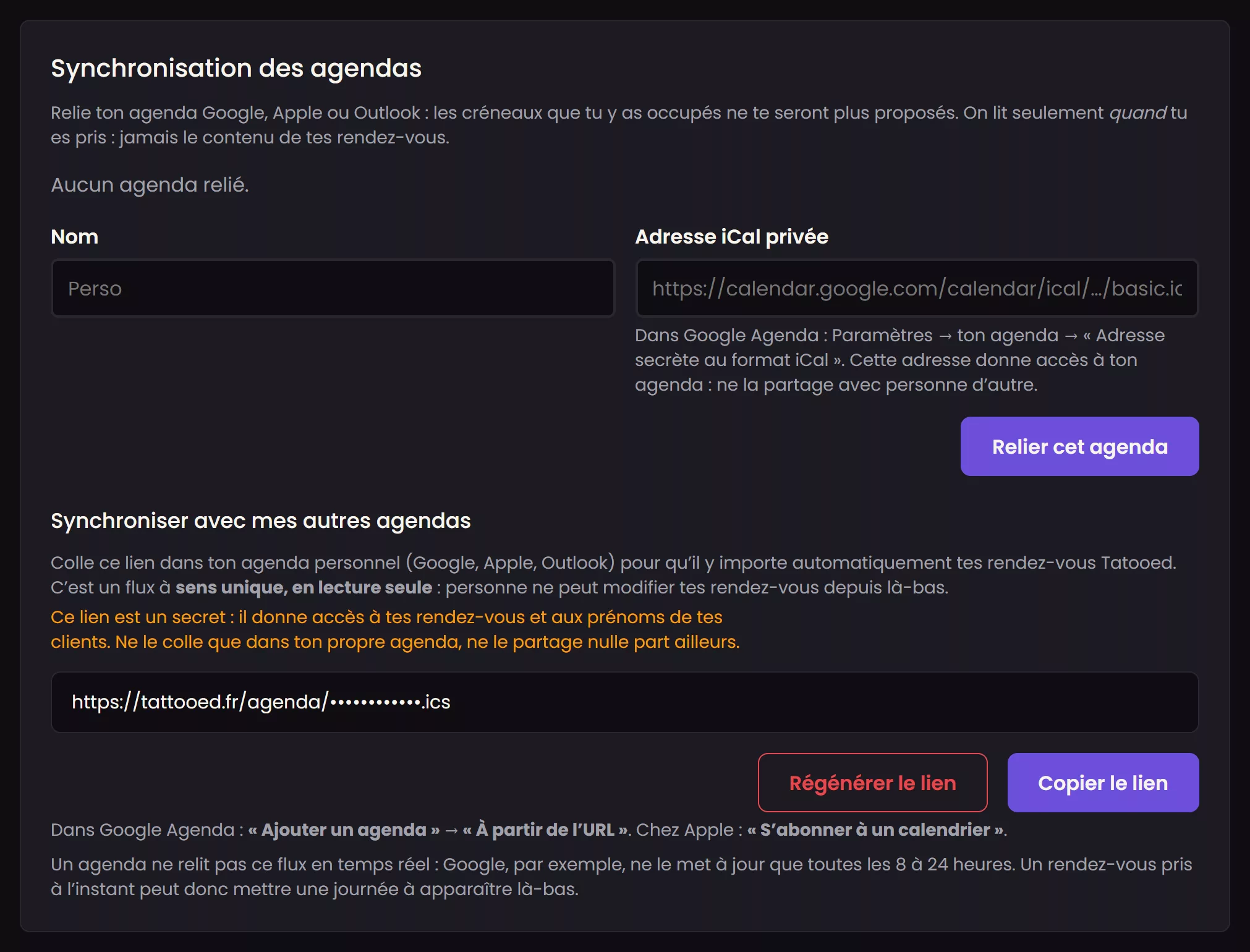
In your /pro dashboard, open "Calendar", select the "Settings" tab, and paste the private iCal address from your Google, Apple, Outlook, or any other calendar service that provides one. Tattooed imports your existing busy times and stops offering those slots to clients, so you do not have to enter them again.
Imported busy times block the slot for everyone, both assignment and your booking page. Conversely, the calendar Tattooed provides includes all your sessions, regardless of where they came from: both assigned clients and your own clients.
Why use an iCal address instead of connecting your account?
In its settings, each calendar service provides a secret, read-only iCal link that you can revoke with one click at any time. Tattooed uses this link and nothing else: there is no direct connection to your Google or Apple account and no permanent access beyond what the link provides.
Steps
- In your external calendar settings, find its secret iCal address.
- In "Calendar", on the "Settings" tab, paste it into the "Private iCal address" field. Give it any name that will help you recognize it, such as "Personal" or "Studio calendar", then click "Connect this calendar".
- Tattooed syncs immediately. You will see either the number of busy times imported or the reason the address was rejected.
The other direction: your sessions in your personal calendar
On the same screen, under "Sync with my other calendars," you will find a link to paste into Google Calendar, Apple, or Outlook. Your Tattooed appointments will appear there in read-only mode. This link is secret because it gives access to your clients' first names. If you share it by mistake, "Regenerate the link" creates a new one. Your personal calendar only refreshes this feed occasionally, sometimes just once a day.
What syncing imports, and for how long
Only upcoming busy times within the near future are imported. Beyond that period, assignment never checks your calendar anyway. Each new sync completely replaces the previous busy times from that feed. An event deleted from the external provider also disappears from Tattooed, so it does not leave a slot blocked unnecessarily.
If syncing fails
A feed download or reading failure does not delete anything. Previously imported busy times remain in place, and only the latest error message is shown. A silent import would be worse than a delayed one because you could unknowingly accept sessions during a personal appointment.
Change or remove a connected calendar
The iCal address is never displayed again after you save it. It is a key that provides full read access to your calendar, and Tattooed never reveals it in any form. To change it, remove the connected calendar and paste its new address. You can always remove it, even if your subscription drops to a tier that would no longer let you connect a new one.
A Visibility plan feature
Connecting an external calendar is part of Tattooed's Visibility subscription plan. Without this tier, the syncing screen remains visible but locked.